Tuya: Smart Life, Smart Living
- 4.5
- Rating
- 10.00M
- Installs
- Free
- Price

 Analysis by App-foxy
When I test a smart-home app, I pay less attention to the promise of a futuristic house and more attention to the small decisions that affect daily life: what I have to connect, what I can control, how clearly the app explains its choices, and how much effort it takes to recover when something stops responding. Tuya - Smart Life,Smart Living is built around that practical side of connected living. It is a free lifestyle app from Tuya Smart Inc. that brings compatible smart-home products into one place, rather than asking me to manage every device through a completely separate application.
That approach is useful, but it also makes the experience depend heavily on the devices I own and the way their manufacturers support Tuya. The app itself can feel like a central control room, while the actual quality of the experience changes from one product to another. I found it most convincing when I treated it as a tool for organizing everyday routines, not as a magic solution that automatically makes every smart device simple.
Its public reception is strong: the Android listing shows a 4.6 average from about 492 thousand ratings, with roughly 6.9 thousand written reviews and more than 10 million installs. Those figures suggest that the platform has reached a substantial audience, although popularity alone does not guarantee that a particular plug, bulb, sensor, or appliance will behave perfectly. The app is free to download, is rated for Everyone, and supports Android 6.0 or later. Optional purchases are listed from $0.49 to $259.99 per item, so I would still check the cost of any connected hardware or optional service before building a whole setup around it.
You May Also Like

 Blood Strike: 2.5 Anniversary
Blood Strike’s Loadouts Turn Every Drop Into a Tactical Gamble
A close look at Blood Strike’s custom loadouts: how fast access to signature weapons reshapes its battle royale rhythm, rewards preparation, and narrows the gap between fights.

 Pandora - Music & Podcasts
Pandora’s Music Is Easy to Start, but Harder to Recover
Pandora’s strength is its low-effort path from a seed to a station. Its weak spot is how much confidence it asks you to place in connection, setup, and quiet recovery.

 8 Ball Pool
 Is Built on Rivalries, Rematches, and Routine
A close look at the rivalries, rematches, shared routines, and unanswered safety questions that turn a quick pool match into a persistent mobile community.

 Samsung Music
’s Quiet Strength Is Playing What You Already Own
Its reach comes less from spectacle than from dependable access to a personal library. That simplicity is both the app’s strongest retention engine and its ceiling.

 AccuWeather: Weather Radar
AccuWeather Review: A Quick, Clear Forecast for Everyday Decisions
For everyday plans, the best forecast is the one you can understand quickly. AccuWeather makes rain timing, radar, and local conditions easy to act on, with a few trade-offs.

 Hill Climb Racing
Why Hill Climb Racing Still Turns Crashes Into One More Run
A tiny car, a bumpy hill and one more upgrade: Hill Climb Racing keeps resurfacing because its simple chaos makes every near-miss feel personal.
More From Our News Desk
View All News


What the app is really trying to solve
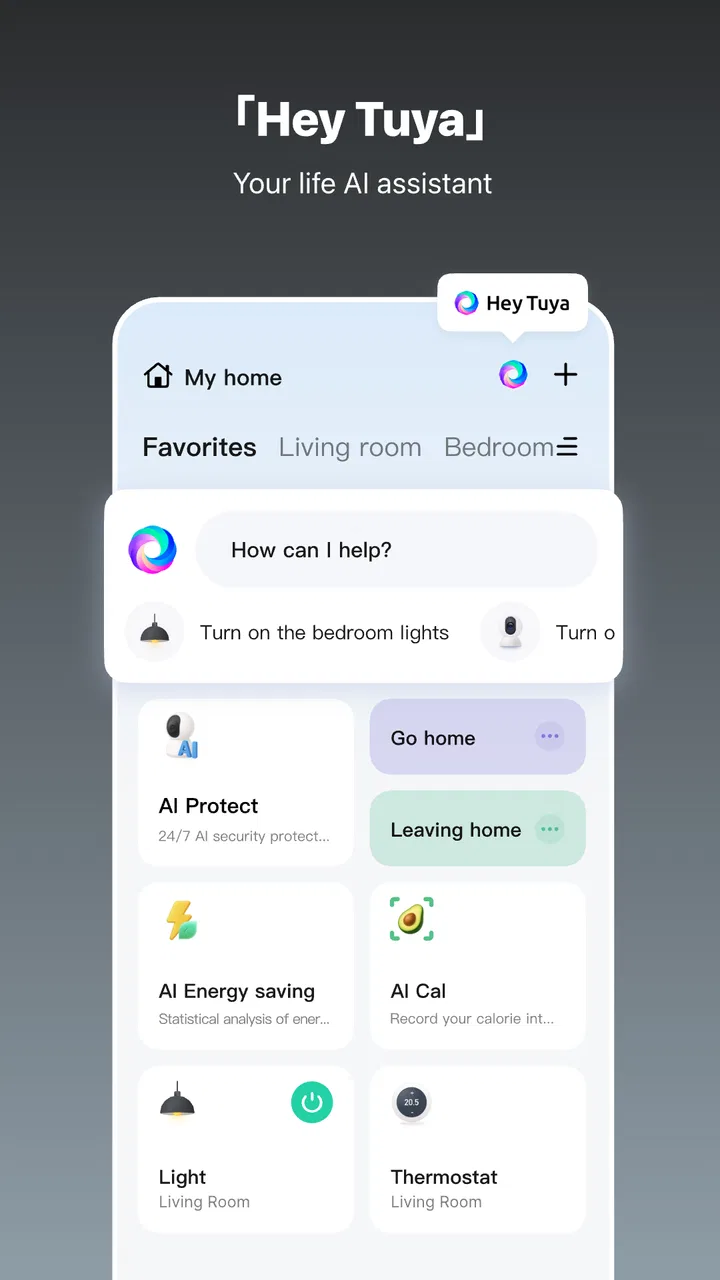
Tuya is best understood as a shared operating layer for smart-home products. Instead of opening one app for a light, another for a plug, and another for an appliance, I can use a single interface when the products are compatible. That is its main appeal. The value is not in one spectacular feature; it is in reducing the number of places I need to visit for ordinary actions.
In a typical home, I might want a living-room light, a bedside lamp, a fan, and a smart plug to appear in the same general system. The benefit becomes clearer when I am tired or in a hurry. Rather than remembering which brand controls which object, I can look for the device in one app and use the controls available for that product. This is especially helpful for households where more than one person needs access to the same devices.
There is an important limitation here: compatibility is not the same as uniformity. Two products that both work with the platform may expose very different controls. One light may offer color and brightness adjustments, while another may provide only on and off commands. An appliance may have schedules or modes that a simple plug cannot understand. I would therefore choose the hardware first and confirm its Tuya support, rather than assuming that every product in a category will offer the same experience.
The app comes from Tuya Smart Inc., a developer focused on connected-device software. Its current version is 7.2.9. I noticed that a current version number matters less here than it would for a standalone notes or camera app, because the overall experience is shaped by three moving parts: the mobile application, the device firmware, and the account or network setup behind them. Keeping the app updated is sensible, but it will not remove every problem caused by a weak wireless signal or an awkward product pairing process.
First setup: where patience pays off
The first useful test is not switching a lamp on; it is adding a device without losing track of what is happening. I recommend starting with one product, giving it a clear name, and placing it in the correct room before adding several more. This sounds basic, but it prevents a common smart-home problem: a crowded device list full of vague names that become difficult to recognize later.
A name such as “hallway lamp” is much more useful than a box label or an unexplained model reference. If several devices are similar, I would name them from the position where I use them, not from the brand. That small choice becomes important when I create routines or give another household member access, because the app can only be as understandable as the labels I provide.
I also prefer testing a newly added device manually for a while before placing it into an automated routine. If the device responds slowly, disconnects, or exposes fewer controls than expected, it is better to discover that before depending on it for a morning schedule or an away-from-home action. This is one of the more practical lessons with Tuya: automation should come after reliable manual control, not before it.
Scenes and routines are useful when kept simple
The most interesting part of a central smart-home app is usually the ability to combine actions. A scene can turn a repeated sequence into one tap, while a schedule can handle an action I perform at a predictable time. I find this more useful for boring routines than for elaborate demonstrations. A simple evening scene that adjusts a few compatible devices is easier to trust than a complicated chain with many conditions.
There is a trade-off between convenience and diagnosis. A single scene may control several products, but if one item fails, I need to work out whether the problem is the scene, that particular device, the network, or the device’s own state. For that reason, I suggest creating routines in stages. First automate one action, then add another only after the first behaves consistently. This makes the setup easier to understand and reduces the chance that one unreliable product will make the whole routine feel broken.
A realistic example is a small apartment where I use a smart plug for a desk lamp and a compatible light in the hallway. When I return in the evening, a scene can make the entrance feel less dark and prepare the workspace without searching for two separate controls. If the plug is offline, I still want the hallway light to work independently. Keeping those functions separate, even if I later group them into one scene, gives me a useful fallback.
Where the unified approach beats separate brand apps
Compared with using the individual apps supplied by different manufacturers, Tuya can reduce app switching and give me a more consistent place to look for shared devices. That matters most when the home contains products from several compatible brands. It can also make a mixed-device household less intimidating for someone who does not want to learn a different interface for every purchase.
The dedicated brand app may still be better for a particular product. A manufacturer may expose more detailed settings, clearer diagnostics, or specialized controls in its own software. If a device has unusual functions that are important to me, I would not automatically replace its original app with Tuya. I would compare both and keep the one that gives me the control I actually need.
This is also not necessarily the right choice for someone who wants a highly technical, locally managed smart-home system with deep customization. Tuya is appealing because it brings ordinary products together in a relatively approachable way. A person who prioritizes advanced local control, detailed network administration, or one very specific ecosystem may prefer a more specialized platform. My recommendation depends on whether convenience across compatible devices matters more than maximum control over the underlying system.
Trust, permissions, and visible choices
Smart-home software deserves a different kind of scrutiny from a casual entertainment app. A connected-device app may sit close to parts of my home routine, so I look for clear account controls, understandable setup steps, and visible choices before granting access or linking products. I do not treat a polished interface as proof that every privacy or security concern has disappeared. I treat it as one part of the decision.
Tuya’s role as a central hub means that account organization matters. I would use a dedicated, strong password rather than reusing one from another service, and I would avoid rushing through setup screens simply to reach the device controls. When an app asks me to connect a product, I want to understand which account is being used and which household members will be able to operate it. Those checks are more valuable than assuming that a single tap automatically creates a safe arrangement.
The most trust-sensitive moments are the ones involving a new device, a shared home, remote operation, or an automation that runs without a tap. I pay close attention to what the screen is asking me to authorize, which device is being affected, and whether I can change the arrangement later. If I am adding a product in a room used by other people, I also consider whether everyone who needs control has a suitable account and whether anyone should have limited access instead of full control.
I would not connect every available product just because the app supports it. A sensible approach is to add only the devices that provide a clear benefit, review the account and device list periodically, and remove old products when they leave the home. This is not a criticism unique to Tuya; it is a basic discipline for any connected-home platform. The centralization that makes the app convenient also makes housekeeping more important.
Control is more than an on-and-off button
Good user agency means being able to understand and change the setup. In practical terms, I want to know which devices are present, what each one is called, which routines involve it, and who can operate it. I also want a manual path when an automation misbehaves. A smart-home routine should save effort, not trap me inside a chain that I can no longer explain.
For that reason, I recommend keeping a simple personal record of the devices and the routines that matter most. It does not need to be technical. A note saying which plug controls which lamp and which scene uses it can save time after a phone change, a reset, or a move. This is a non-obvious advantage of thinking like a system owner rather than a casual user: clear documentation protects me from my own future confusion.
Another useful habit is to test routines under normal conditions and then test the fallback. If a scheduled action does not happen, can I still open the app and control the device manually? If a visitor needs the light, will the naming make sense? If I replace one product, do I know which scene needs editing? These questions reveal whether the setup gives me genuine control or merely appears convenient when everything is working.
I also avoid building routines around assumptions that are too precise. A schedule may be appropriate for a lamp used at a regular time, but it is less suitable when my routine changes daily. In that case, a manual scene can be more honest and less frustrating. The best automation is not the one with the most steps; it is the one that continues to match how I actually live.
Everyday friction I would plan for
The largest weakness is that one app cannot completely hide the complexity of connected hardware. Pairing may depend on the device being ready, the phone being on the right network, and the product having enough signal to communicate. When something fails, the app may be the first place I look even when the real cause is elsewhere. That can make troubleshooting feel less direct than using a simple physical switch.
Device naming can also become a problem as a home grows. A few products are easy to manage; a larger collection needs consistent room names, device types, and routine names. Without that discipline, the central dashboard becomes a long list rather than a helpful overview. I would rather spend a few minutes organizing the setup at the beginning than repeatedly search for the correct device later.
There is also a human limitation: not everyone wants smart controls. A household member may prefer a wall switch, a physical remote, or a straightforward button. I would not make a shared room dependent on an app-only routine unless everyone is comfortable with it. Smart control works best when it complements familiar controls instead of making ordinary actions unnecessarily mysterious.
The free entry point is attractive, but I would separate the cost of the app from the cost of ownership. Compatible hardware can vary widely, and optional in-app purchases are listed between $0.49 and $259.99 per item. Before spending, I would ask whether the product solves a real problem, whether it can be controlled manually, and whether I would still use it if the routine stopped working. That test prevents a cheap-looking setup from becoming an expensive collection of devices I rarely touch.
Who should use it, and who should choose something else
I think Tuya is a good fit for someone starting with a few compatible smart-home products and wanting one approachable place to manage them. It is also useful for a mixed-brand household where the main goal is reducing app clutter. People who enjoy small practical improvements—scheduled lighting, grouped controls, or a single place to check several devices—are likely to get the most from it.
I would be more cautious if I were buying hardware solely because its packaging mentions compatibility. I would first confirm the exact functions I need, not just whether the product can connect. I would also hesitate to make it the foundation of a home where advanced local operation, specialist integrations, or detailed technical controls are essential. In those situations, the manufacturer’s own application or a more specialized smart-home platform may be a better match.
Families and shared homes should think about access before installation. The person who sets everything up should not be the only person who understands the controls. Clear names, simple scenes, and a manual fallback make the system friendlier to others. If I cannot explain how to operate a light or plug in ordinary language, the setup is probably more complicated than it needs to be.
My cautious verdict
After using it as a practical control center, I see Tuya - Smart Life,Smart Living as a useful organizer rather than a complete answer to every smart-home concern. Its strongest quality is the ability to bring compatible products into one everyday workflow. Its weakest point is the unavoidable variation between devices, networks, and manufacturers. The app can simplify the surface, but it cannot guarantee that every connected product will feel equally polished.
I would recommend starting small, choosing one or two products with a clear purpose, and learning the account, naming, sharing, and routine controls before expanding. Keep important lights or appliances usable through a physical control, and treat remote or automated actions as conveniences that deserve testing. That approach gives me the benefits without pretending that a smart-home system is maintenance-free.
The app is free, available to an Everyone audience, and its broad adoption makes it a reasonable platform to investigate when compatible hardware is already part of my plans. Still, I would make the purchase decision around the exact device and the controls I need, not around the app alone. My final recommendation is measured: choose it when simple multi-device organization matters, but choose a more specialized alternative when maximum technical control or a single-brand feature set matters more.
FAQs for Tuya: Smart Life, Smart Living
01What is Tuya - Smart Life, Smart Living?
Tuya - Smart Life, Smart Living is a versatile app designed to control and manage smart home devices. It integrates with a wide range of products like lights, thermostats, and security cameras, offering users the ability to automate and streamline their home environment through a single interface.
02How do I set up devices with Tuya - Smart Life?
To set up devices with Tuya, first ensure your smart device is compatible. Download the app and create an account. Follow the in-app instructions to add a new device, ensuring it's in pairing mode. The app will guide you through connecting the device to your Wi-Fi network for seamless control.
03Is Tuya - Smart Life compatible with voice assistants?
Yes, Tuya - Smart Life is compatible with popular voice assistants like Amazon Alexa and Google Assistant. This feature allows you to control your devices using voice commands, providing a hands-free experience. Simply link your Tuya account to the voice assistant app to get started.
04Are there any subscription fees for using Tuya - Smart Life?
Tuya - Smart Life is free to download and use. However, some advanced features or integrations may require in-app purchases or subscriptions. It's essential to check the app's details and any specific device requirements to understand potential costs involved.
05How secure is Tuya - Smart Life in terms of data privacy?
Tuya - Smart Life prioritizes user data privacy by employing encryption protocols to protect your information. The app adheres to international security standards, but users should also ensure their network is secure and regularly update both the app and connected devices to safeguard against vulnerabilities.
Pros
- User-friendly interface for quick setup.
- Supports a wide range of smart devices.
- Customizable automation and routines.
- Remote control from anywhere via app.
- Regular updates with new features.
Cons
- Limited compatibility with some brands.
- Occasional connectivity issues reported.
- Requires stable internet for optimal use.
- Some features locked behind paywalls.
- Privacy concerns over data collection.

Tuya: Smart Life, Smart Living
Gallery